Showing posts with label T-SQL. Show all posts

Tuesday, March 23, 2021

How to replace invisible ASCII special characters or control characters

One of the common challenges of transforming data that could get complicated is the removal of ASCII special characters such as newlines or tabs. In this blog, we take a look at some details about the ASCII characters and ways of removal. Let’s look at the type of ASCII character that involves & ways to replace data transformation. Mostly we can use the REPLACE command to clear these but need more understanding to identify the special characters.

ASCII function: Returns the ASCII code value of the leftmost character of a character expression.

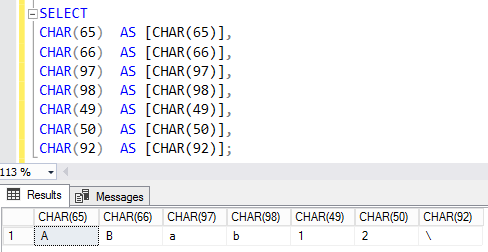
CHAR function: This function converts an int ASCII code to a character value.

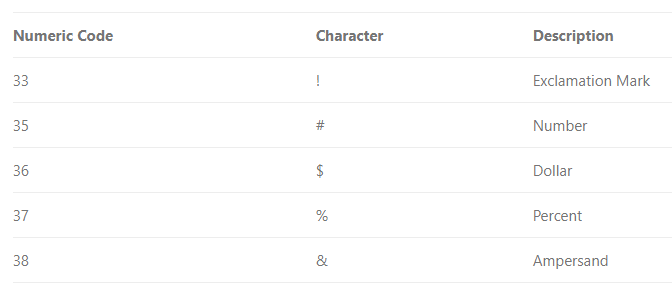
Commonly used ASCII Printable Characters


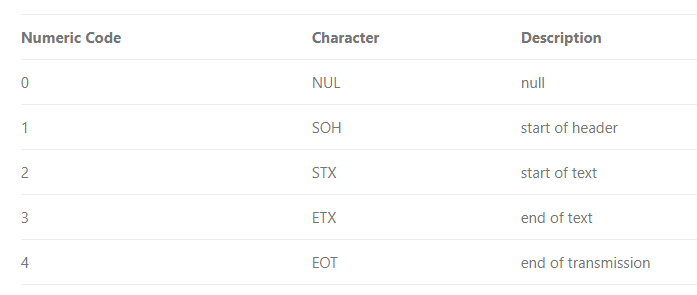
Control characters

Use CHAR to insert control characters into character strings. This table shows some frequently used control characters.

This example uses CHAR (13) to print the name and e-mail address of an employee on separate lines, when the query returns its results as text. 

Another important thing is to identify the special characters, most of these control characters are not visible in usual applications.

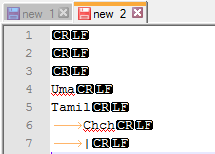
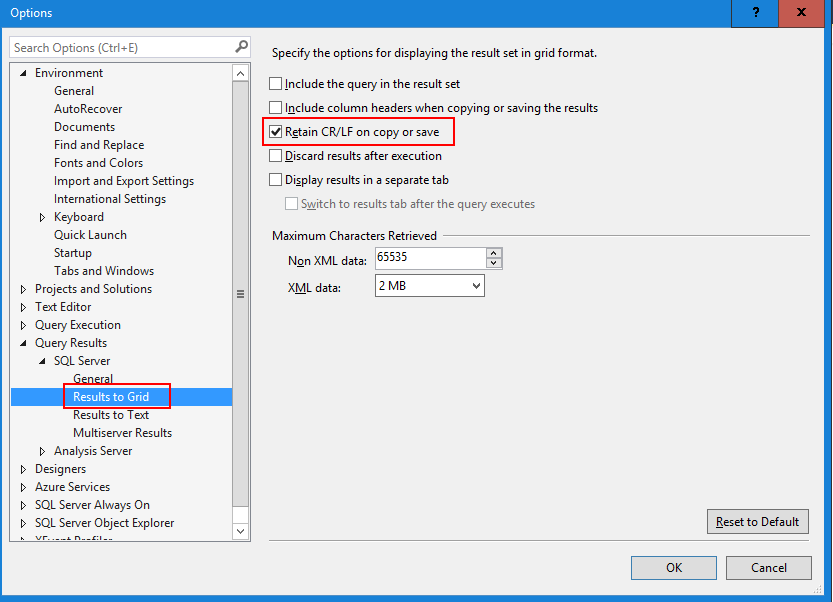
To view ASCII control characters, you can use Notepad++ or SSMS

In Notepad++ enable Show All Character option.

In SSMS enable Retain CR/LF on copy and save option.

Cheers!
Uma

Wednesday, April 10, 2019

How to hold or disable a SQL Agent Job until other SQL Agent Job to complete

There are instances that one job might cause issues with another job that runs parallel. In this kind of situation, it is better to hold or disabled the job until other jobs are completed.

Step 1: Disable the job

sp_update_job is used for changes the attributes of a job

@enabled - Specifies whether the job is enabled (1) or not enabled (0)


EXEC dbo.sp_update_job  

    @job_name = @job_name_1  

    @enabled = 0;

Step 2: Wait to finish already running job

WHILE EXISTS (

SELECT 1

FROM msdb.dbo.sysjobactivity

JOIN msdb.dbo.sysjobs

ON sysjobactivity.[job_id] = sysjobs.[job_id]

WHERE sysjobactivity.[session_id] = (  

SELECT TOP 1 [session_id] 

FROM msdb.dbo.syssessions 

ORDER BY [agent_start_date] DESC)

AND sysjobactivity.[start_execution_date] IS NOT NULL

AND sysjobactivity.[stop_execution_date] IS NULL

AND sysjobs.[name] = @job_name_2

)

BEGIN


    WAITFOR DELAY '00:00:15'

END


Step 3: Once the job is completed, you can re-enable the job

 EXEC dbo.sp_update_job  

 @job_name = @job_name_1  

 @enabled = 0;

Cheers!
Uma

Monday, January 7, 2019

Recursive Common Table Expressions (CTE) with examples

Specifies a temporary named result set, known as a common table expression (CTE). It is commonly used for recursion when a function calls itself multiple times & make queries and subqueries more readable.
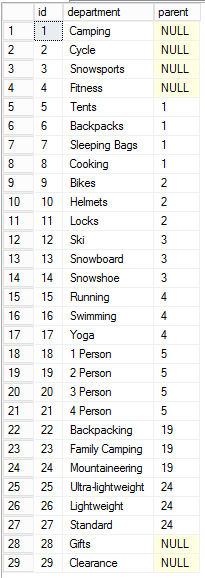
Simple CTE Syntax
;WITH deptCTE (id, department, parent) AS 
(  
SELECT id, department, parent 
FROM Departments
) 
SELECT * FROM deptCTE;
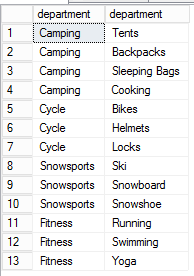
Self JOIN a subquery


--Subquery without CTE

SELECT q1.department, q2.department
FROM   (SELECT id, department, parent 
    FROM Departments) as q1
INNER JOIN (SELECT id, department, parent 
    FROM Departments) as q2 
  ON q1.id = q2.parent
WHERE q1.parent is null;

--Subquery with CTE
;WITH deptCTE(id, department, parent) AS 
(SELECT id, department, parent
  FROM Departments) 
SELECT q1.department, q2.department
  FROM deptCTE q1
 INNER JOIN deptCTE q2 on q1.id = q2.parent
 WHERE q1.parent is null;

Recursive CTE
It is recursive when the CTE references itself
WITH Numbers (N) AS 
( SELECT
   UNION ALL 
  SELECT 1 + N FROM Numbers 
   WHERE N < 1000
) 
 SELECT
   FROM Numbers 
 OPTION (MAXRECURSION 0);
Recursion stops when the second SELECT produces no results
Specify MAXRECURSION: Default is 100 & MAXRECURSION of 0 implies no maximum
Uses: Hierarchical listing of categories & Recursive calculations
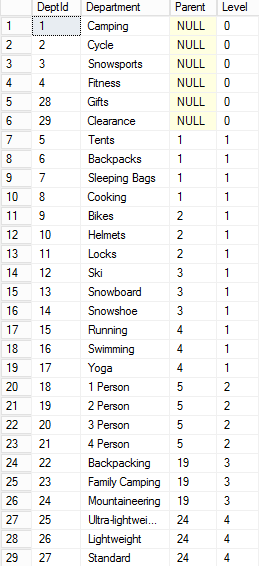
-- Recursive CTE
;WITH DepartmentCTE(DeptId, Department, Parent, Level) AS 
( SELECT id as DeptId, Department, parent, 0 as Level 
    FROM Departments
   WHERE parent is NULL 
   UNION ALL 
/***** and now for the recursive part *****/
  SELECT d.id as DeptId, d.Department, d.parent,
         DepartmentCTE.Level + 1 as Level 
    FROM Departments d
    INNER JOIN DepartmentCTE
    ON DepartmentCTE.DeptId = d.parent) 
SELECT * 
FROM DepartmentCTE
ORDER BY parent
/*****Specify MAXRECURSION*****/
OPTION (MAXRECURSION 0);

                     
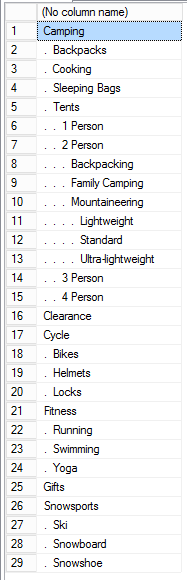
You can use in multiple ways for formatting the hierarchy
--Recursive CTE with Tree Path
;WITH DepartmentCTE(DeptId, Department, Parent, Level, TreePath) AS 
(SELECT id as DeptId, Department, Parent, 0 as Level,
cast(Department as varchar(1024)) as TreePath
    FROM Departments
   WHERE parent is NULL 
   UNION ALL -- and now for the recursive part 
  SELECT d.id as DeptId, d.Department, d.parent,
         DepartmentCTE.Level + 1 as Level,
         cast(DepartmentCTE.TreePath + ' -> ' + 
              cast(d.department as varchar(1024)) 
            as varchar(1024)) as TreePath
    FROM Departments d
    INNER JOIN DepartmentCTE
    ON DepartmentCTE.DeptId = d.parent) 
SELECT * 
  FROM DepartmentCTE
 ORDER BY TreePath;
--Recursive CTE with Indentation
;WITH DepartmentCTE(DeptId, Department, Parent, Level, TreePath) AS 
( SELECT id as DeptId, Department, parent, 0 as Level,
cast(Department as varchar(1024)) as TreePath
    FROM Departments
   WHERE parent is NULL 
   UNION ALL -- and now for the recursive part 
  SELECT d.id as DeptId, d.Department, d.parent,
         DepartmentCTE.Level + 1 as Level,
         cast(DepartmentCTE.TreePath + ' -> ' + 
              cast(d.department as varchar(1024)) 
            as varchar(1024)) as TreePath
    FROM Departments d
    INNER JOIN DepartmentCTE
    ON DepartmentCTE.DeptId = d.parent) 
SELECT REPLICATE('.  ', Level) + Department
  FROM DepartmentCTE
 ORDER BY TreePath;
Recursive CTE is improve the performance, but using a CTE for re-use of a subquery does not improve performance.
To understand the breaks down execution refer this example, I took this from Stackoverflow site.
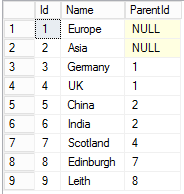
CREATE TABLE tbl ( 
      Id INT 
    , [Name] VARCHAR(20) 
    , ParentId INT 
) 

INSERT INTO tbl( Id, Name, ParentId ) 
VALUES 
     (1, 'Europe', NULL) 
    ,(2, 'Asia',   NULL) 
    ,(3, 'Germany',   1) 
    ,(4, 'UK',        1) 
    ,(5, 'China',     2) 
    ,(6, 'India',     2) 
    ,(7, 'Scotland',  4) 
    ,(8, 'Edinburgh', 7) 
    ,(9, 'Leith',     8)  
;WITH abcd 
    AS ( 
        -- anchor 
        SELECT  id, Name, ParentID, 
                CAST(Name AS VARCHAR(1000)) AS Path 
        FROM    tbl 
        WHERE   ParentId IS NULL 
        UNION ALL 
          --recursive member 
        SELECT  t.id, t.Name, t.ParentID, 
                CAST((a.path + '/' + t.Name) AS VARCHAR(1000)) AS "Path"
        FROM    tbl AS
                JOIN abcd AS
                  ON t.ParentId = a.id 
       )
SELECT * FROM abcd OPTION (MAXRECURSION 1000);
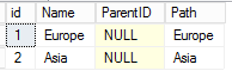
  1. The anchor statement is executed. This gives you a set of results, called the base set, or T0.


  1. The recursive statement is executed, using T0 as the table to execute the query against. This happens automatically when you query a CTE.

T1

  1. If the recursive member returns some results, it creates a new set, T1. The recursive member is then executed again, using T1 as input, creating T2 if there are any results.

T2

T3
        
         T4
       

  1. Step 3 continues until no more results are generated, OR the maximum number of recursions has been met, as set by the MAX_RECURSION option.


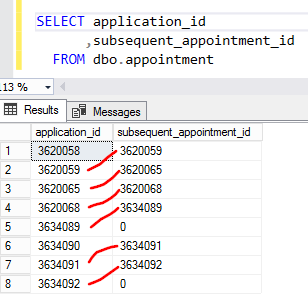
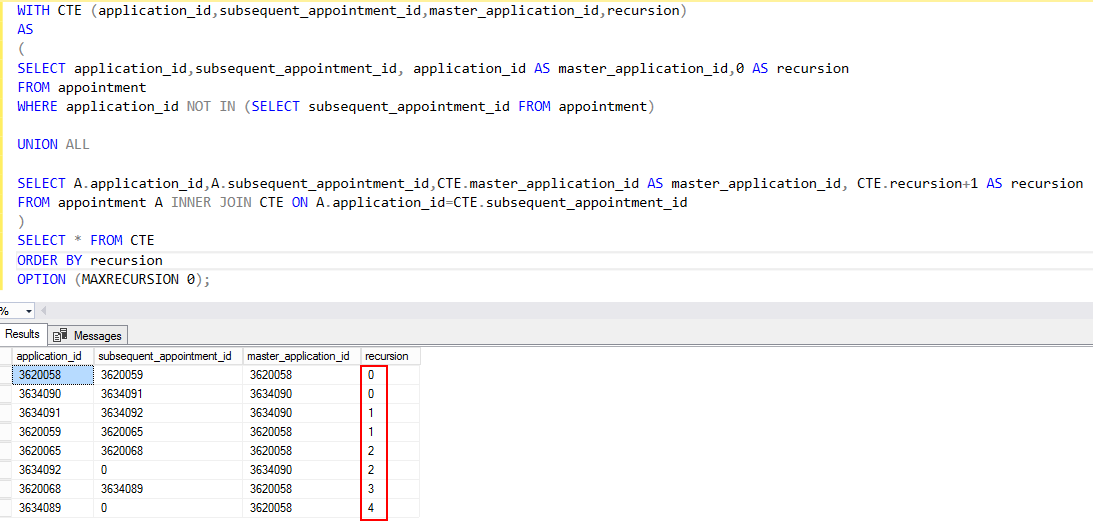
Another real common real world example is here, let’s say you have to find the master application_id for the current application_id.
To understand recursion, I have added additional columns as recursion. The recursion will end when the second query does not return any value.


Cheers!

Uma