Wednesday, July 11, 2018

What are the use of Collation in SQL SERVER?

What is the use of Collation in SQL SERVER?
SQL Server collation is a configuration setting that determines how the database engine should treat character data at a server, database, column level, or casting operation.
Collation name can be either a Windows collation name or a SQL collation name. All SQL Server collation names begin with SQL_. 
--Get all the collations
SELECT name, description
FROM sys.fn_helpcollations()
--SQL Server Collation
SELECT SERVERPROPERTY('collation')
--Database collation
SELECT name,collation_name
  FROM sys.databases
  WHERE NAME like '%Adventureworks%'
SQL Server Level Collation
The first is to provide a character set that defines the bit patters. SQL Server stored character data using either one byte or two-byte per character, depending on the column’s data type and assigned collation. For example, European languages require only a single-byte character set, which supports up to 256 bit patterns. On the other hand, many Asian languages include thousands of characters and require a double-byte character set, which supports up to 65,536 bit patterns.
Column Level Collation
As with database definitions, you can add the COLLATE clause when defining a character column. In this way, you can apply a specific collation to the column’s data, without impacting the rest of the database.
Sorted differently using Collation
The following example creates a simple table and inserts 4 rows. Then the example applies two collations when selecting data from the table, demonstrating how Chiapas is sorted differently.
Join differently using Collation
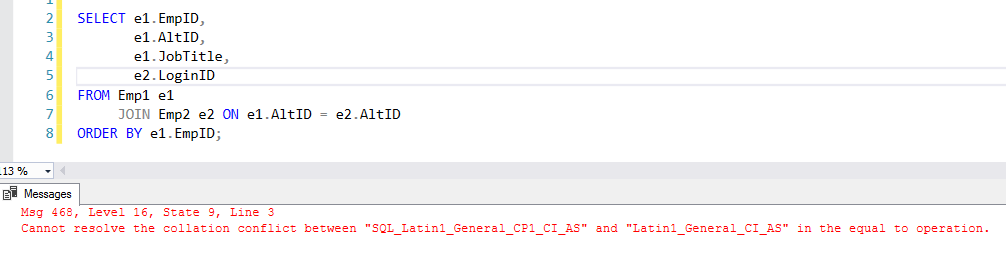
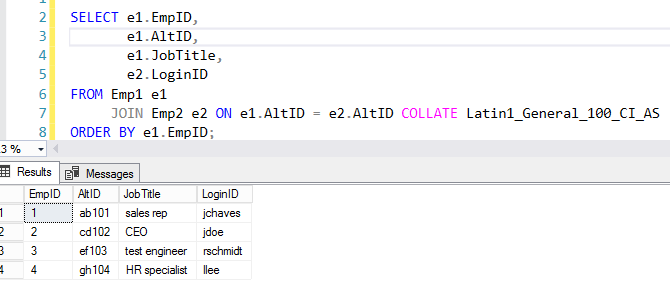
Sometimes you need to join tables that use different collation. In this case, you can use collation in the join.
Cheers!
Uma

Tuesday, June 26, 2018

How to execute the query only when record count is not zero

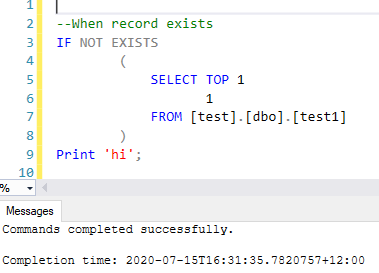
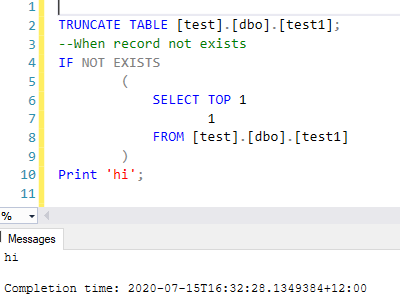
You can achieve this in many ways, the easiest way is, use SELECT TOP 1 1 FROM TABLE

SELECT TOP 1 = Selecting the very 1st record in the result set


SELECT 1 = return 1 as the result set


SELECT TOP 1 1 FROM [SomeTable] WHERE <SomeCondition> Means if the condition is true and any rows are returned from the select, only return top 1 row and only return integer 1 for the row (no data just the integer 1 is returned).


Cheers!
Uma

Wednesday, May 2, 2018

How to download latest file from SFTP using PowerShell in SSIS

These days most of the organizations use SFTP files transfer protocol. There is still no any inbuilt component in SSIS to download the files from SFTP, but there is a component for FTP.

Most of use C# or PowerShell code to avoid cost for 3rd party components. In this blog, I explain how to use PowerShell with WinScp. First you need to install WinSCP library and most of the code you can get from https://winscp.net/forum

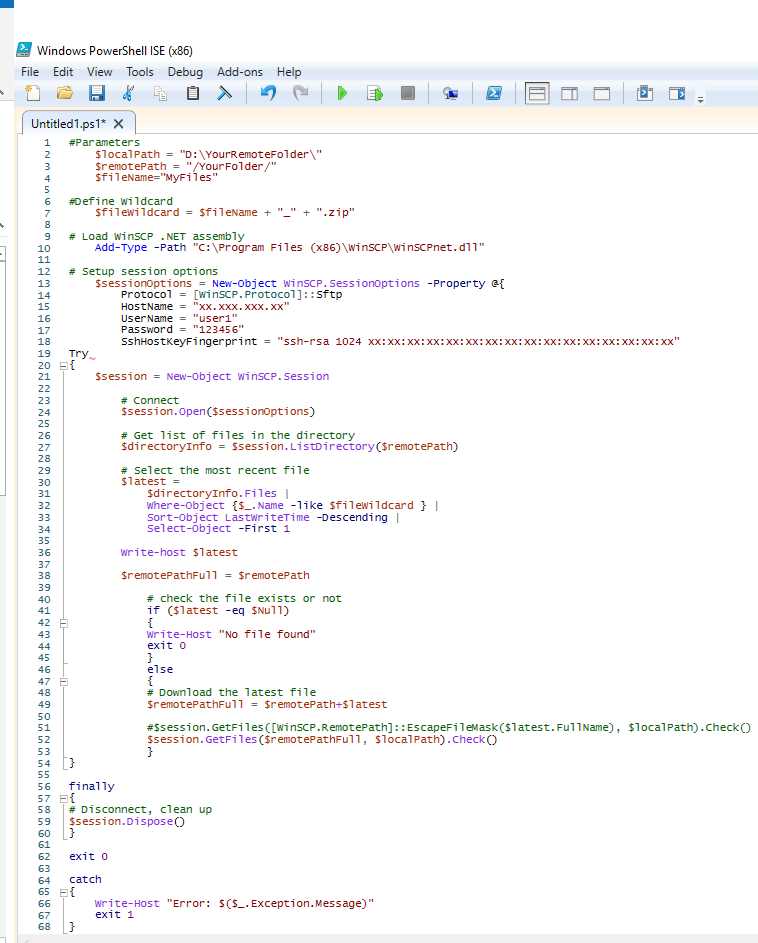
Here is the example code to download the latest file using wildcard


<#####################

Code

######################>

#Parameters

    $localPath = "D:\YourRemoteFolder\"

    $remotePath = "/YourFolder/"

$fileName="MyFiles"

#Define Wildcard

$fileWildcard = $fileName + "_" + ".zip"

# Load WinSCP .NET assembly 

    Add-Type -Path "C:\Program Files (x86)\WinSCP\WinSCPnet.dll"

 # Setup session options

    $sessionOptions = New-Object WinSCP.SessionOptions -Property @{

        Protocol = [WinSCP.Protocol]::Sftp

        HostName = "xx.xxx.xxx.xx"

        UserName = "user1"

        Password = "123456"

        SshHostKeyFingerprint = "ssh-rsa 1024 xx:xx:xx:xx:xx:xx:xx:xx:xx:xx:xx:xx:xx:xx:xx:xx"

}

Try

{

    $session = New-Object WinSCP.Session

        # Connect

        $session.Open($sessionOptions)

        # Get list of files in the directory

        $directoryInfo = $session.ListDirectory($remotePath)

        # Select the most recent file

        $latest =

            $directoryInfo.Files |

            Where-Object {$_.Name -like $fileWildcard } |

            Sort-Object LastWriteTime -Descending |

            Select-Object -First 1

         Write-host $latest

        $remotePathFull = $remotePath

                # check the file exists

            if ($latest -eq $Null)

            {

            Write-Host "No file found"

            exit 0

            }

            else 

            {

            # Download the selected file

            $remotePathFull = $remotePath+$latest


            #$session.GetFiles([WinSCP.RemotePath]::EscapeFileMask($latest.FullName), $localPath).Check()

            $session.GetFiles($remotePathFull, $localPath).Check()

            }   

}


finally

{

# Disconnect, clean up

$session.Dispose()

}

 exit 0

catch

{

    Write-Host "Error: $($_.Exception.Message)"

    exit 1

}

<#####################

Code End

######################>

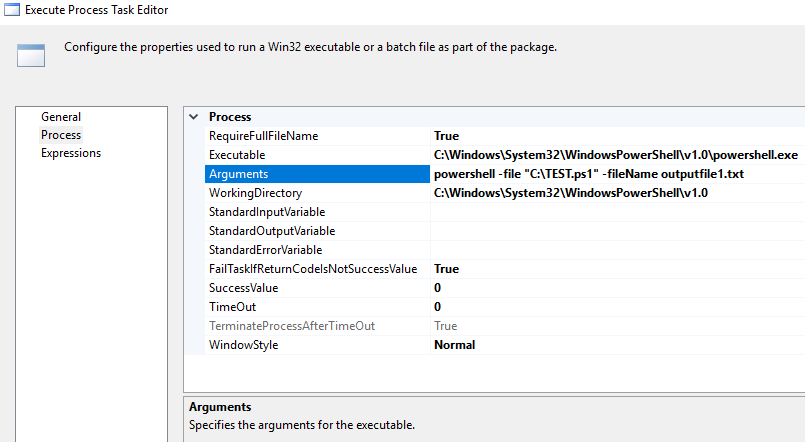
You can call this PowerShell script using Execute Process Task under SSIS

Cheers!
Uma

Wednesday, April 25, 2018

How to download email attachment into a local folder using SSIS

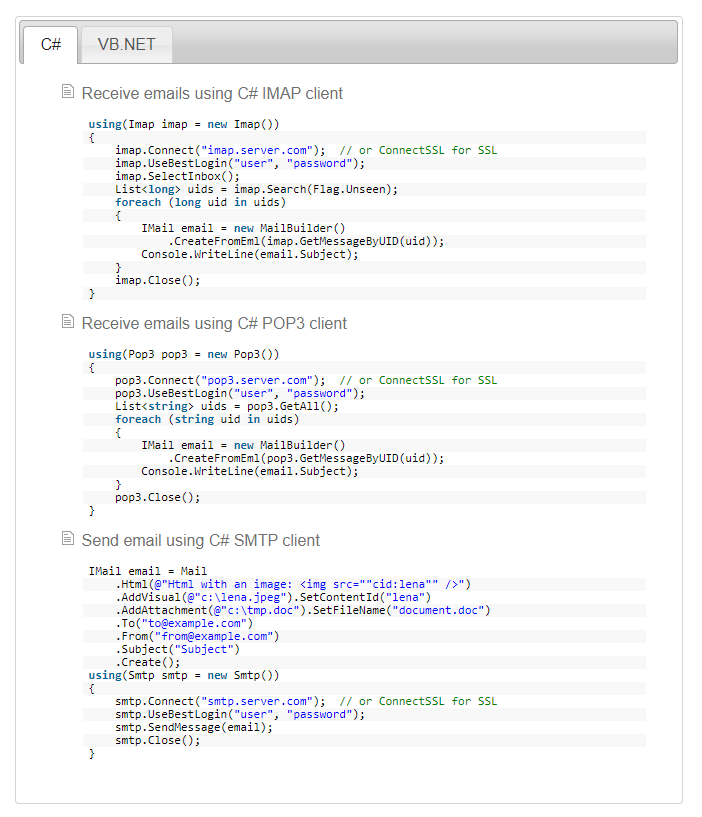
SSIS doesn’t come with any component to download the email attachments. The only way is use script task. You can use your own code or third-party libraries. If the business requirement is more complex I would recommend using third-part libraries rather write your own code. Limilabs Mail.dll .NET email component makes your jobs easy, you can read more details here https://www.limilabs.com/mail. You can find similar libraries and use it.

Add references and then add the following libraries based on your requirement

using Limilabs.Client.IMAP;

using Limilabs.Mail;

using Limilabs.Mail.Headers;

Cheers!
Uma

Tuesday, March 20, 2018

How do we know Index Fragmentation is to rebuild or reorganize

Once indexes are created, they will undergo automatic maintenance by the SQL Server Database Engine whenever insert, update or delete operations are executed on the underlying data. These automatic modifications will continuously scatter the information in the index throughout the database – fragmenting the index over time. 

The result – indexes now have pages where logical ordering (based on the key-value) differs from the physical ordering inside the data file. This means that there is a high percentage of free space on the index pages and that SQL Server has to read a higher number of pages when scanning each index. Also, ordering of pages that belong to the same index gets scrambled and this adds more work to the SQL Server when reading an index – especially in IO terms.

The solution to fragmented indexes is to rebuild or reorganize indexes.

Index reorganization - Index reorganization is a process where the SQL Server goes through the existing index and cleans it up. While index reorganization is a pure clean-up operation that leaves the system state as it is without locking-out affected tables and views.

 Index rebuild - index is deleted and then recreated from scratch with an entirely new structure, free from all piled up fragments and empty-space pages. the rebuild process locks the affected table for the whole rebuild period, which may result in long down-times that could not be acceptable in some environments

To decide which one to do, it is important to answer two main questions:

1. What is the degree of fragmentation?

2. What is the appropriate action? Reorganize or rebuild?


Detecting fragmentation information for an index or table or database

sys.dm_db_index_physical_stats will return size and fragmentation information for the data and indexes of the specified table or view in SQL Server. Read this link for full details.


DECLARE @db_id SMALLINT;  

DECLARE @object_id INT;  


SET @db_id = DB_ID(N'AdventureWorks2017');  

SET @object_id = OBJECT_ID(N'AdventureWorks2017.Person.Address');  


IF @db_id IS NULL  

BEGIN;  

    PRINT N'Invalid database';  

END;  

ELSE IF @object_id IS NULL  

BEGIN;  

    PRINT N'Invalid object';  

END;  

ELSE  

BEGIN;  

    SELECT * FROM sys.dm_db_index_physical_stats(@db_id, @object_id, NULL, NULL , 'LIMITED');  

END;  

GO  


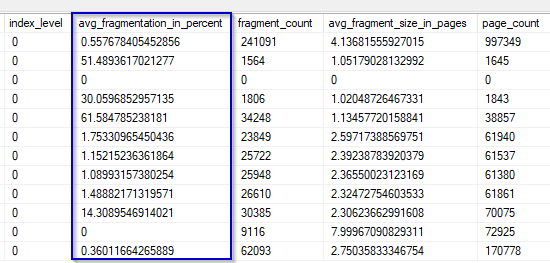
Generally accepted solution based on the percent of fragmentation - avg_fragmentation_in_percent column from the previously described sys.dm_db_index_physical_stats function.

Fragmentation is less than 10% – no de-fragmentation is required. 

Fragmentation is between 10-30% – it is suggested to perform index reorganization

Fragmentation is higher than 30% – it is suggested to perform index rebuild

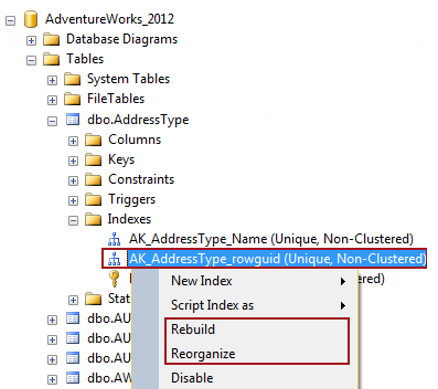
Using SQL Server Management Studio:

using Transact-SQL

Further details please read the following links

https://docs.microsoft.com/en-us/sql/relational-databases/system-dynamic-management-views/sys-dm-db-index-physical-stats-transact-sql?redirectedfrom=MSDN&view=sql-server-ver15

https://solutioncenter.apexsql.com/why-when-and-how-to-rebuild-and-reorganize-sql-server-indexes/#:~:text=Index%20reorganization%20is%20a%20process,fragments%20and%20empty%2Dspace%20pages.

Cheers!
Uma

Friday, February 9, 2018

How to implement Many-to-Many Relationships in Tabular model Analysis Service in SQL Server

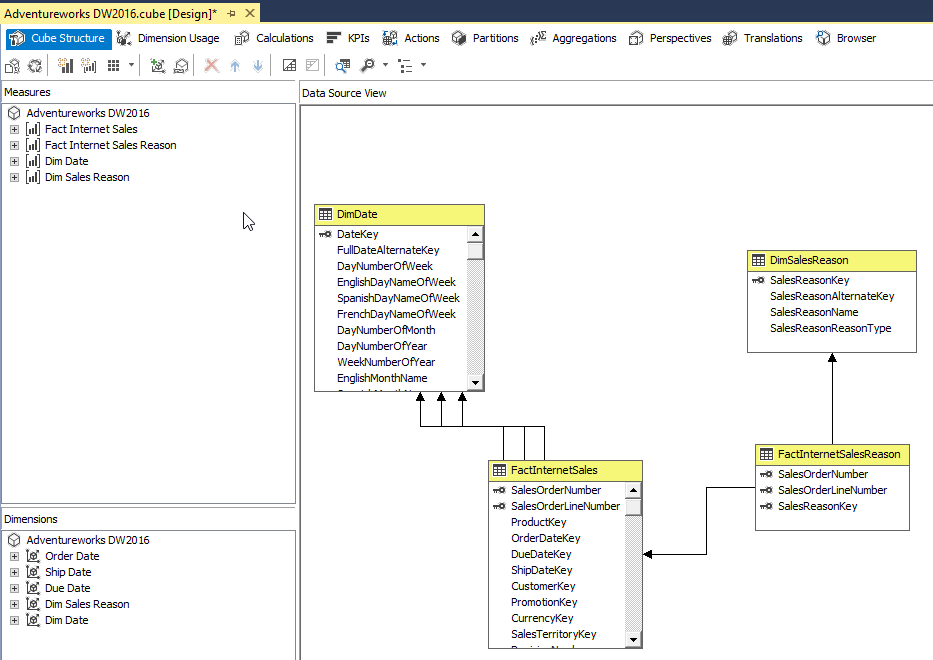
First, let’s look at how to implement many-to-many relationship in Multi-dimensional cube. The Adventure Works DW provide great example to understand the concept. If you look at the below diagram, there is no relationship between Sales Reason and Internet Sales here. In this case, the bridge table FactInternetSalesReason, bridges the sales reason and from theDiSalesReason dimension to the FactInternetSales fact table by these 2 columns SalesOrderNumber and SalesOrderLineNumber.
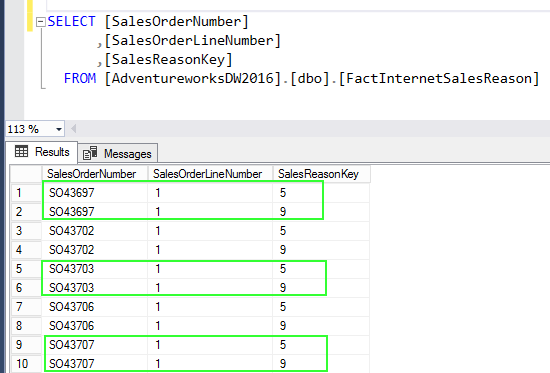
The FactInternetSalesReason table can have multiple entries for the same order number and line number.

You see there are no relationship between Sales Reason and Internet Sales in the cube.
Many-to-many relationships are not automatically built through the wizards in the multidimensional cube or tabular model. The relationship needs to configure as per below.
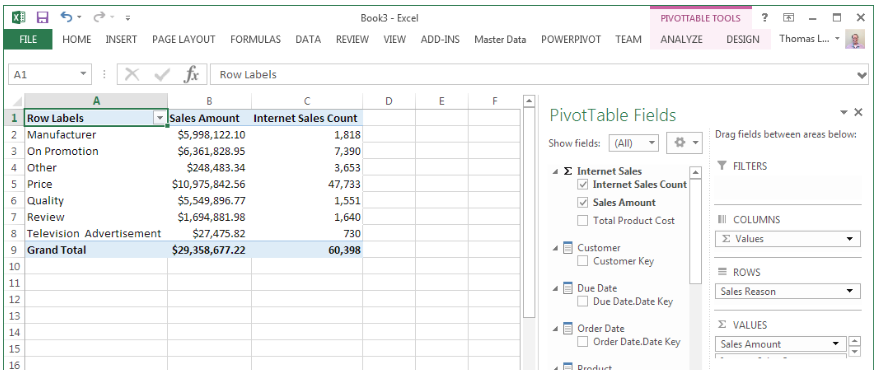
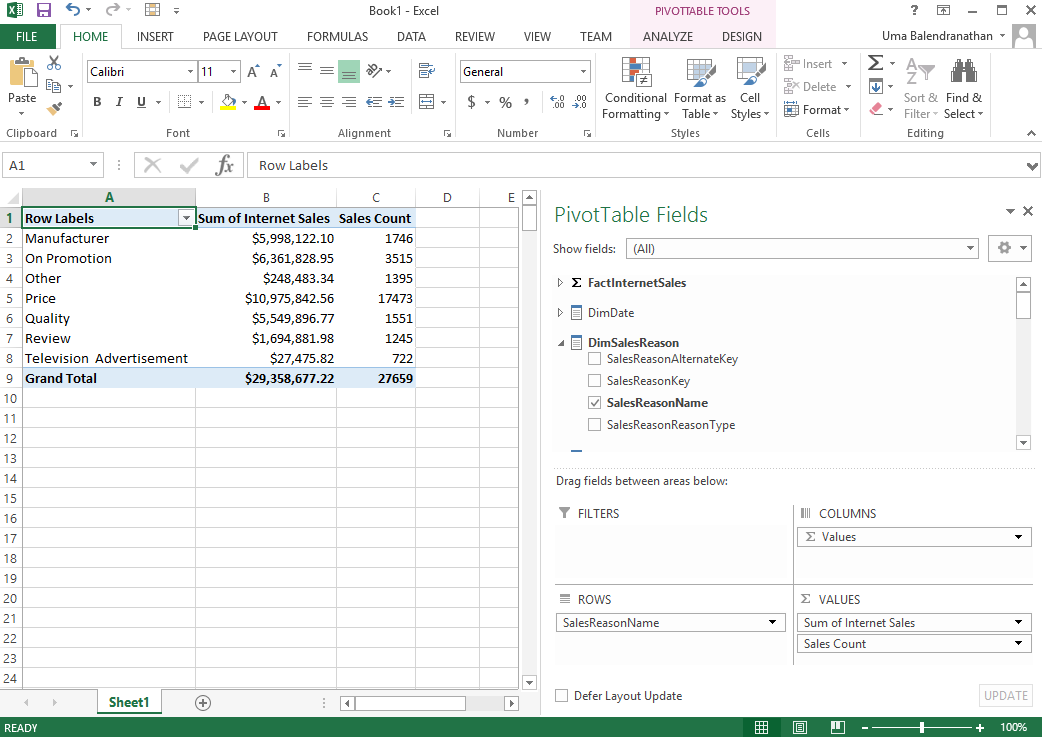
Once implement the appropriate relationship, now shows correct values.

In the Tabular model, Bi-directional cross filters feature is used for many-to-many relationship. New in SQL Server 2016 is a built-in approach for enabling bi-directional cross filters in tabular models, eliminating the need for hand-crafted DAX workarounds for propagating filter context across table relationships.
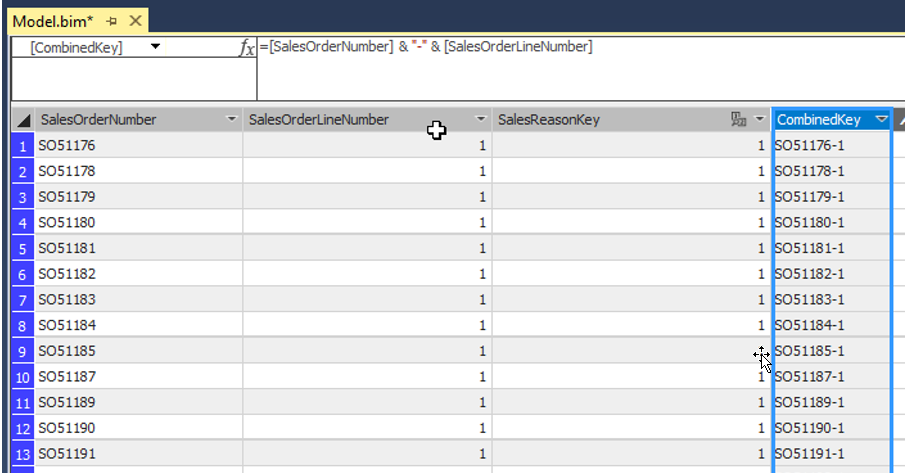
As I mentioned earlier, there is no relationship between these two fact tables when you import the tables into tabular model. Let’s created a calculated column in both the tables, they can be used to join the 2 fact tables. In this case [SalesOrderNumber] & "-" & [SalesOrderLineNumber] logic used to created the calculated column named called CombinedKey.
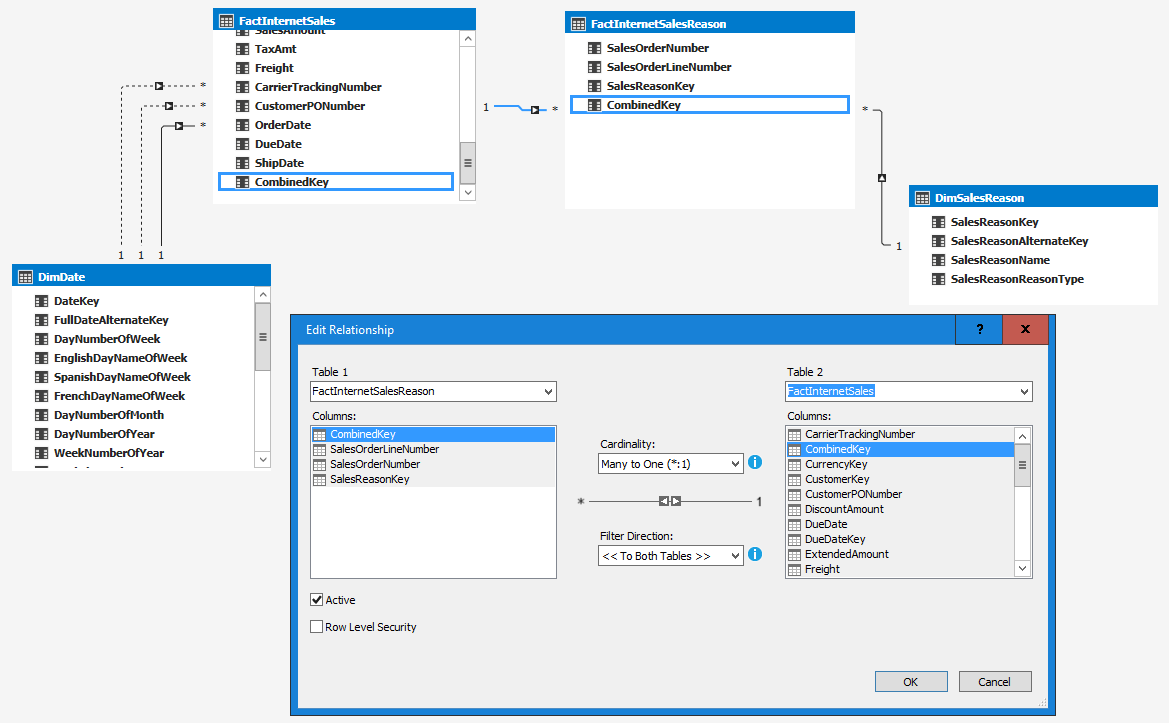
Once joined the tables using the CombinedKey and then select filter direction to “To Both Tables”.
Now you can see the correct results while analyzing in Excel.

Cheers!
Uma

Tuesday, January 2, 2018

When to use CROSS APPLY and OUTER APPLY

CROSS APPLY operator is very similar to CROSS JOIN. For example, the following two queries return the same result sets.
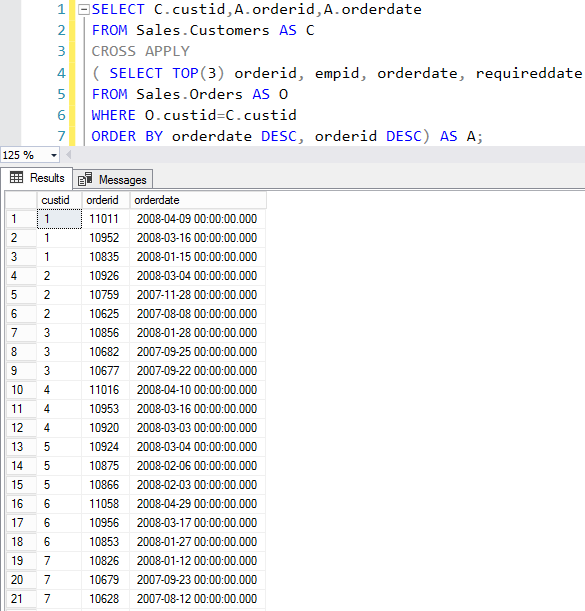
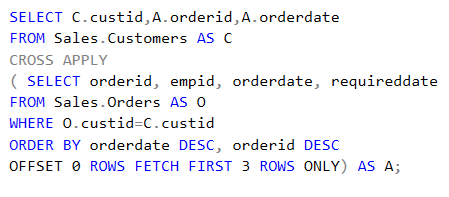
The difference is, the right table expression can represent a different set of rows per each row from the left table. For example, if you want to return most recent order from customer
In addition, in complex queries you can use OFFSET FETCH options.
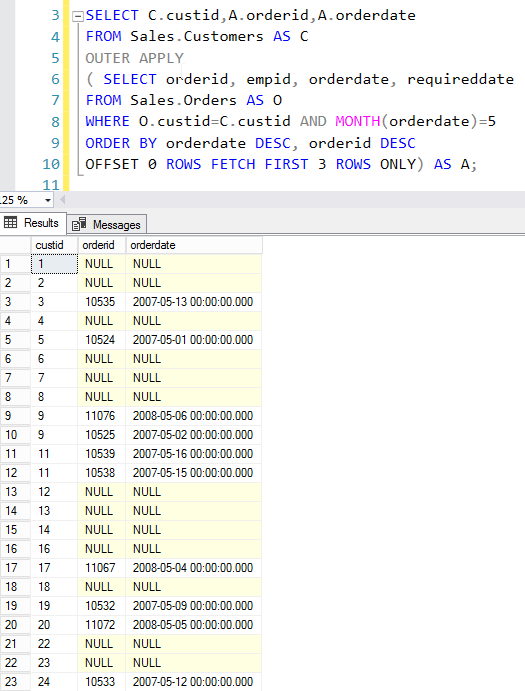
The problem with this CROSS APPLY, if the right table expression returns empty set then does not return corresponding left rows. If you want to return all the left table rows then you should use OUTER APPLY.
Cheers!
Uma