Showing posts with label SQL. Show all posts

Tuesday, March 23, 2021

How to replace invisible ASCII special characters or control characters

One of the common challenges of transforming data that could get complicated is the removal of ASCII special characters such as newlines or tabs. In this blog, we take a look at some details about the ASCII characters and ways of removal. Let’s look at the type of ASCII character that involves & ways to replace data transformation. Mostly we can use the REPLACE command to clear these but need more understanding to identify the special characters.

ASCII function: Returns the ASCII code value of the leftmost character of a character expression.

CHAR function: This function converts an int ASCII code to a character value.
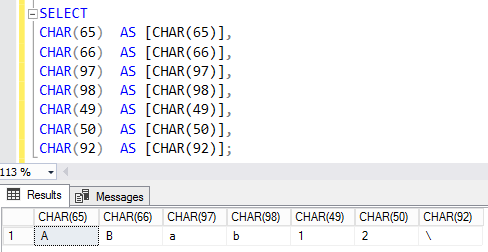
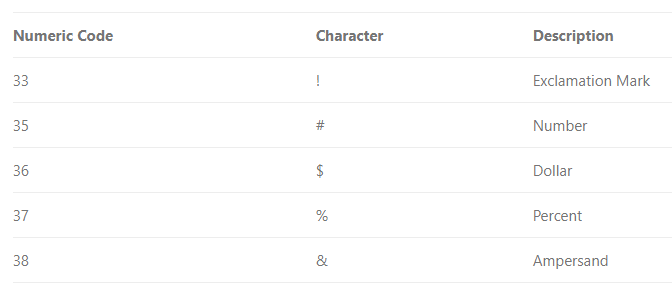
Commonly used ASCII Printable Characters

Control characters

Use CHAR to insert control characters into character strings. This table shows some frequently used control characters.
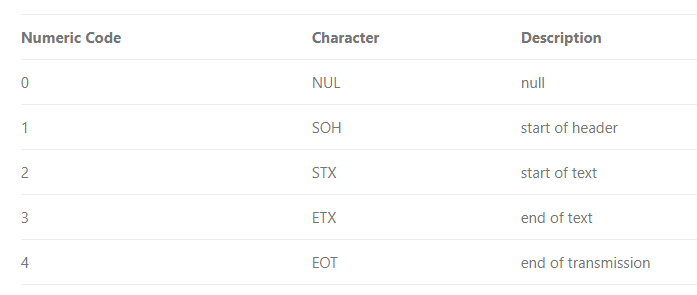
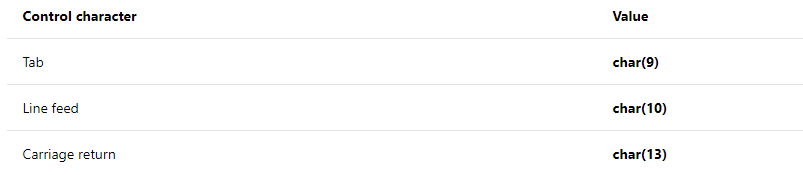
This example uses CHAR (13) to print the name and e-mail address of an employee on separate lines, when the query returns its results as text. 

Another important thing is to identify the special characters, most of these control characters are not visible in usual applications.

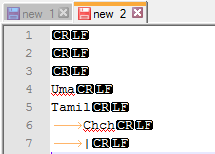
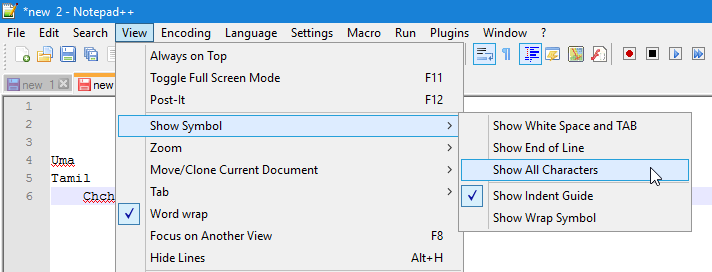
To view ASCII control characters, you can use Notepad++ or SSMS

In Notepad++ enable Show All Character option.
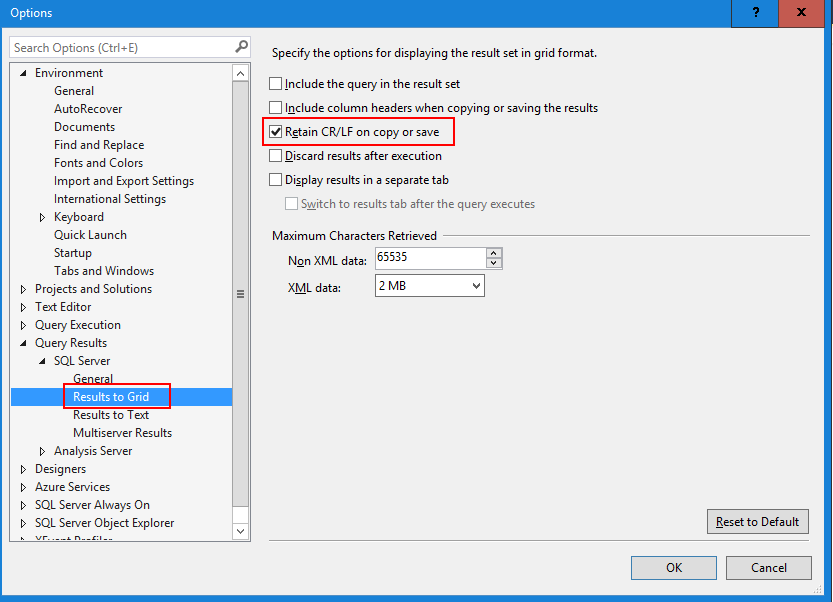
In SSMS enable Retain CR/LF on copy and save option.
Cheers!
Uma

Tuesday, June 26, 2018

How to execute the query only when record count is not zero

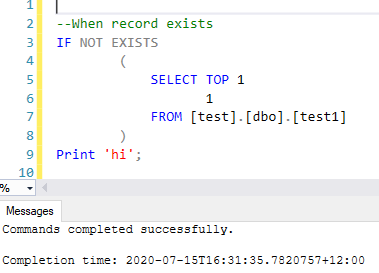
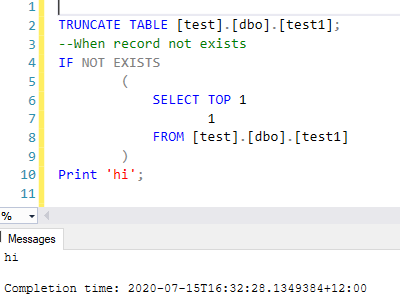
You can achieve this in many ways, the easiest way is, use SELECT TOP 1 1 FROM TABLE

SELECT TOP 1 = Selecting the very 1st record in the result set


SELECT 1 = return 1 as the result set


SELECT TOP 1 1 FROM [SomeTable] WHERE <SomeCondition> Means if the condition is true and any rows are returned from the select, only return top 1 row and only return integer 1 for the row (no data just the integer 1 is returned).


Cheers!
Uma

Friday, June 16, 2017

How to check if temporary / permanent objects exists and drop if it exists before creating them

There are many ways to perform drop the existing objects before create them. One of the common way use OBJECT_ID as shown below.


--for a permanent table you can use
IF OBJECT_ID('dbo.tabl1', 'U') IS NOT NULL
 DROP TABLE dbo.tabl1;
--for a temporary table you can use
IF OBJECT_ID('tempdb.dbo.#tbl1', 'U') IS NOT NULL
 DROP TABLE #tbl1;


In SQL Server 2016, new function DROP IF EXISTS introduced to perform this task. Currently, the following objects can DIE.
--from SQL Server 2016 and later
DROP PROCEDURE IF EXISTS
dbo.tabl1, dbo.tab2, dbo.tab3, dbo.tab4, dbo.tab5, #tbl1;
--to drop Stored Procedure
DROP PROCEDURE IF EXISTS
dbo.sp1, dbo.sp2;
Cheers!
Uma

Friday, January 6, 2017

How to generate Smart date key from Year, Month and Date

SELECT CONVERT (INT, CONVERT(VARCHAR (8), DATEFROMPARTS([year],[month],[date]),112))
FROM dbo.FactSales;
DATEFROMPARTS (year, month, day)
112 Format = yyyymmdd ISO

Thursday, November 17, 2016

How to skip Weekends in DATEADD

In many cases, DATEADD function might need to use skipping weekends (Saturday and Sunday). For example, you might need to find all the invoices that are pending more than 5 working days.

SELECT *
FROM dbo.Invoice
WHERE [DAYSADDNOWK](InvoiceCreatedDate,5) < GETDATE()


CREATE FUNCTION DAYSADDNOWK(@addDate AS DATE, @numDays AS INT)
RETURNS DATETIME
AS
BEGIN
    SET @addDate = DATEADD(d, @numDays, @addDate)
    IF DATENAME(DW, @addDate) = 'sunday'   SET @addDate = DATEADD(d, 1, @addDate)
    IF DATENAME(DW, @addDate) = 'saturday' SET @addDate = DATEADD(d, 2, @addDate)
  
    RETURN CAST(@addDate AS DATETIME)
END
GO


This function is work for up to add 7 days. To support more than 7 days, the following function is used.
CREATE FUNCTION DAYSADDNOWK(@addDate AS DATE, @numDays AS INT)
RETURNS DATETIME
AS
BEGIN
    WHILE @numDays>0
    BEGIN
       SET @addDate=DATEADD(d,1,@addDate)
       IF DATENAME(DW,@addDate)='saturday' SET@addDate=DATEADD(d,1,@addDate)
       IF DATENAME(DW,@addDate)='sunday' SET @addDate=DATEADD(d,1,@addDate)
  
       SET @numDays=@numDays-1
    END
  
    RETURN CAST(@addDate AS DATETIME)
END
GO


The above functions are taken from below link. Please read this article for more deatils
Note that this functions are not consider the holidays.

Cheers! Uma