Wednesday, April 25, 2018

How to download email attachment into a local folder using SSIS

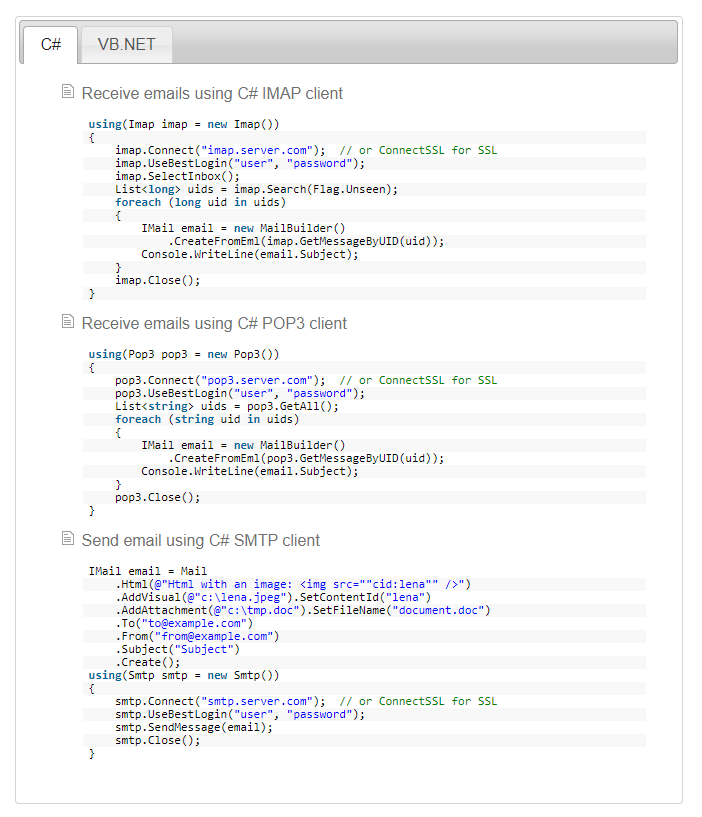
SSIS doesn’t come with any component to download the email attachments. The only way is use script task. You can use your own code or third-party libraries. If the business requirement is more complex I would recommend using third-part libraries rather write your own code. Limilabs Mail.dll .NET email component makes your jobs easy, you can read more details here https://www.limilabs.com/mail. You can find similar libraries and use it.

Add references and then add the following libraries based on your requirement

using Limilabs.Client.IMAP;

using Limilabs.Mail;

using Limilabs.Mail.Headers;

Cheers!
Uma

Tuesday, March 20, 2018

How do we know Index Fragmentation is to rebuild or reorganize

Once indexes are created, they will undergo automatic maintenance by the SQL Server Database Engine whenever insert, update or delete operations are executed on the underlying data. These automatic modifications will continuously scatter the information in the index throughout the database – fragmenting the index over time. 

The result – indexes now have pages where logical ordering (based on the key-value) differs from the physical ordering inside the data file. This means that there is a high percentage of free space on the index pages and that SQL Server has to read a higher number of pages when scanning each index. Also, ordering of pages that belong to the same index gets scrambled and this adds more work to the SQL Server when reading an index – especially in IO terms.

The solution to fragmented indexes is to rebuild or reorganize indexes.

Index reorganization - Index reorganization is a process where the SQL Server goes through the existing index and cleans it up. While index reorganization is a pure clean-up operation that leaves the system state as it is without locking-out affected tables and views.

 Index rebuild - index is deleted and then recreated from scratch with an entirely new structure, free from all piled up fragments and empty-space pages. the rebuild process locks the affected table for the whole rebuild period, which may result in long down-times that could not be acceptable in some environments

To decide which one to do, it is important to answer two main questions:

1. What is the degree of fragmentation?

2. What is the appropriate action? Reorganize or rebuild?


Detecting fragmentation information for an index or table or database

sys.dm_db_index_physical_stats will return size and fragmentation information for the data and indexes of the specified table or view in SQL Server. Read this link for full details.


DECLARE @db_id SMALLINT;  

DECLARE @object_id INT;  


SET @db_id = DB_ID(N'AdventureWorks2017');  

SET @object_id = OBJECT_ID(N'AdventureWorks2017.Person.Address');  


IF @db_id IS NULL  

BEGIN;  

    PRINT N'Invalid database';  

END;  

ELSE IF @object_id IS NULL  

BEGIN;  

    PRINT N'Invalid object';  

END;  

ELSE  

BEGIN;  

    SELECT * FROM sys.dm_db_index_physical_stats(@db_id, @object_id, NULL, NULL , 'LIMITED');  

END;  

GO  


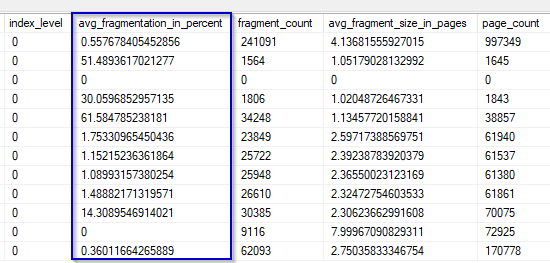
Generally accepted solution based on the percent of fragmentation - avg_fragmentation_in_percent column from the previously described sys.dm_db_index_physical_stats function.

Fragmentation is less than 10% – no de-fragmentation is required. 

Fragmentation is between 10-30% – it is suggested to perform index reorganization

Fragmentation is higher than 30% – it is suggested to perform index rebuild

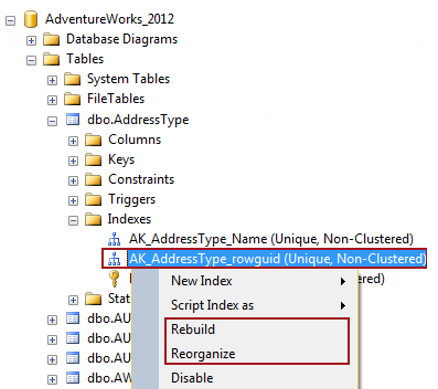
Using SQL Server Management Studio:

using Transact-SQL

Further details please read the following links

https://docs.microsoft.com/en-us/sql/relational-databases/system-dynamic-management-views/sys-dm-db-index-physical-stats-transact-sql?redirectedfrom=MSDN&view=sql-server-ver15

https://solutioncenter.apexsql.com/why-when-and-how-to-rebuild-and-reorganize-sql-server-indexes/#:~:text=Index%20reorganization%20is%20a%20process,fragments%20and%20empty%2Dspace%20pages.

Cheers!
Uma

Friday, February 9, 2018

How to implement Many-to-Many Relationships in Tabular model Analysis Service in SQL Server

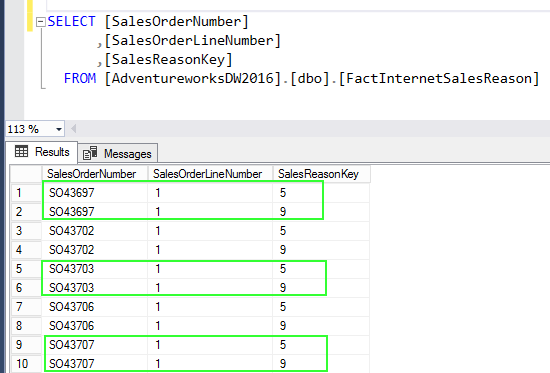
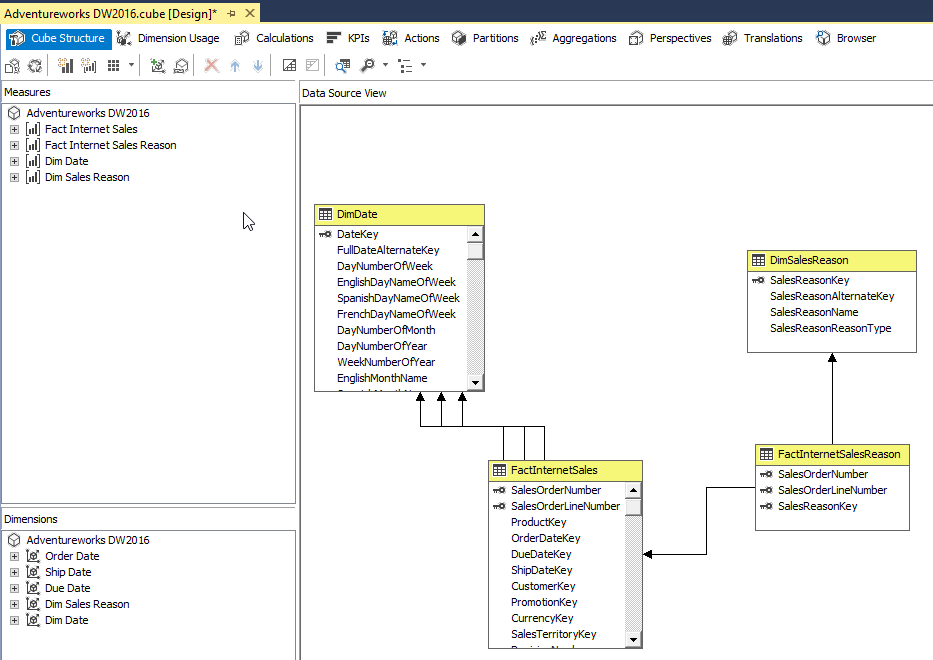
First, let’s look at how to implement many-to-many relationship in Multi-dimensional cube. The Adventure Works DW provide great example to understand the concept. If you look at the below diagram, there is no relationship between Sales Reason and Internet Sales here. In this case, the bridge table FactInternetSalesReason, bridges the sales reason and from theDiSalesReason dimension to the FactInternetSales fact table by these 2 columns SalesOrderNumber and SalesOrderLineNumber.
The FactInternetSalesReason table can have multiple entries for the same order number and line number.

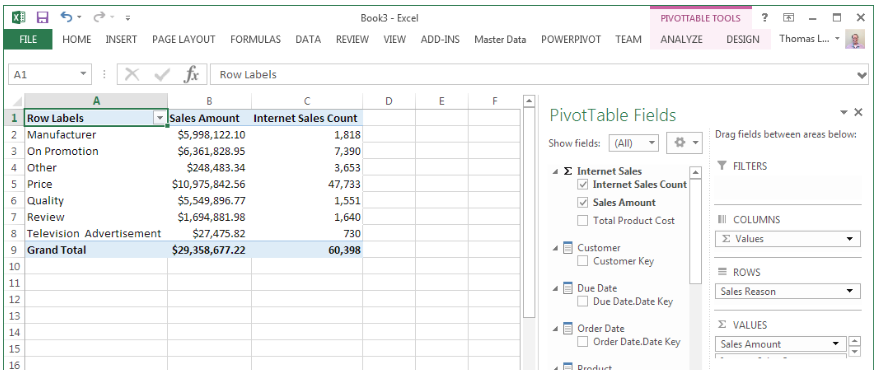
You see there are no relationship between Sales Reason and Internet Sales in the cube.
Many-to-many relationships are not automatically built through the wizards in the multidimensional cube or tabular model. The relationship needs to configure as per below.
Once implement the appropriate relationship, now shows correct values.

In the Tabular model, Bi-directional cross filters feature is used for many-to-many relationship. New in SQL Server 2016 is a built-in approach for enabling bi-directional cross filters in tabular models, eliminating the need for hand-crafted DAX workarounds for propagating filter context across table relationships.
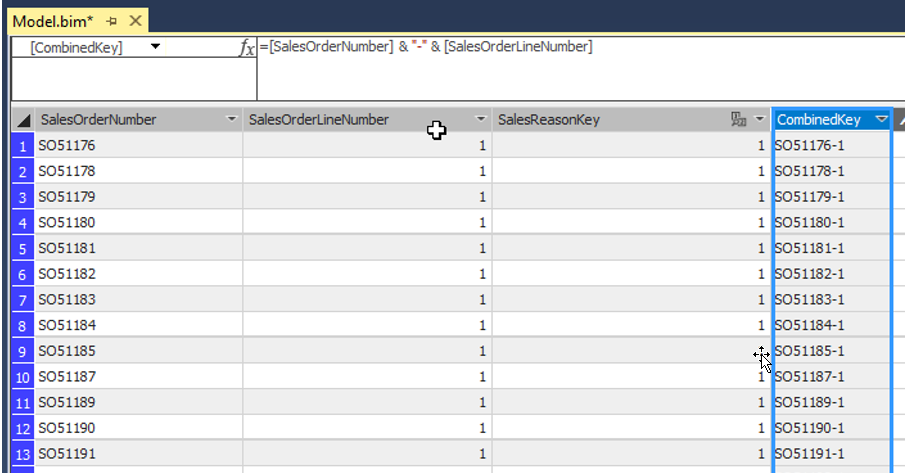
As I mentioned earlier, there is no relationship between these two fact tables when you import the tables into tabular model. Let’s created a calculated column in both the tables, they can be used to join the 2 fact tables. In this case [SalesOrderNumber] & "-" & [SalesOrderLineNumber] logic used to created the calculated column named called CombinedKey.
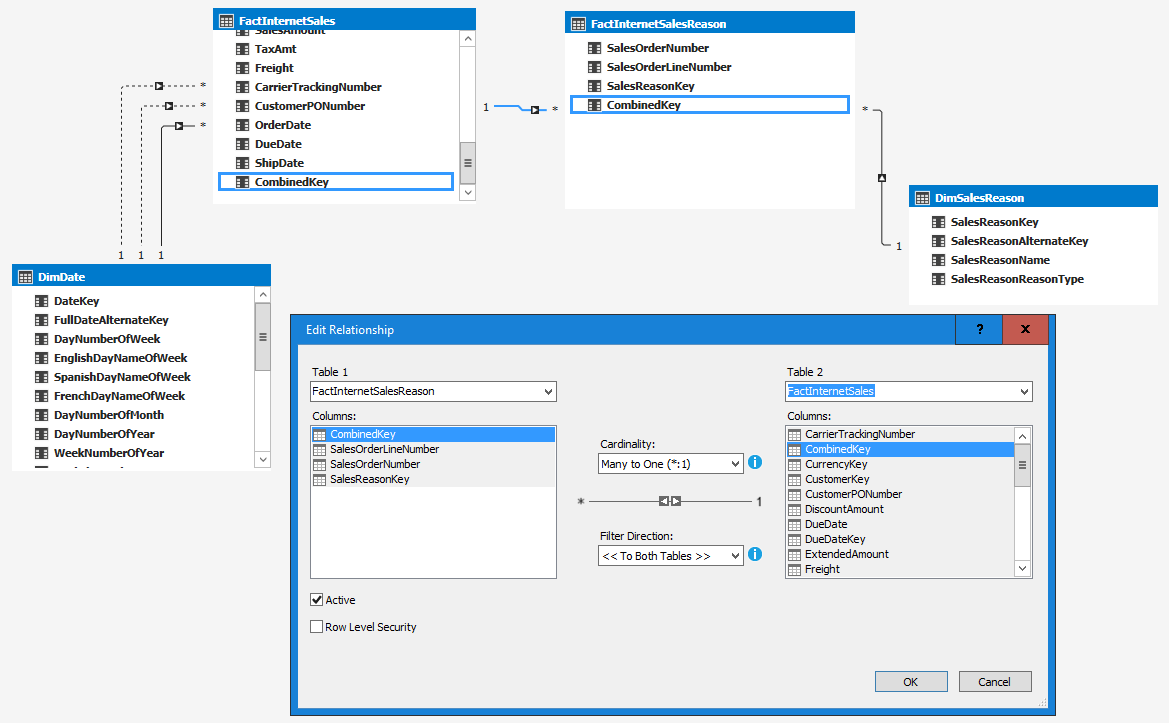
Once joined the tables using the CombinedKey and then select filter direction to “To Both Tables”.
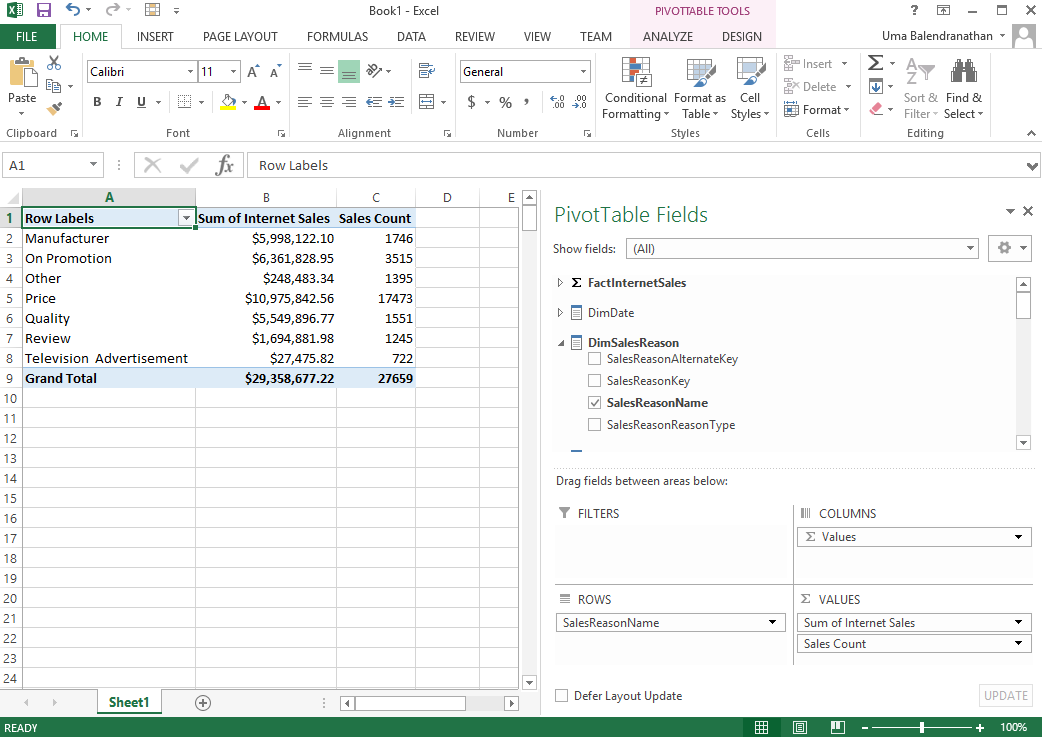
Now you can see the correct results while analyzing in Excel.

Cheers!
Uma

Tuesday, January 2, 2018

When to use CROSS APPLY and OUTER APPLY

CROSS APPLY operator is very similar to CROSS JOIN. For example, the following two queries return the same result sets.
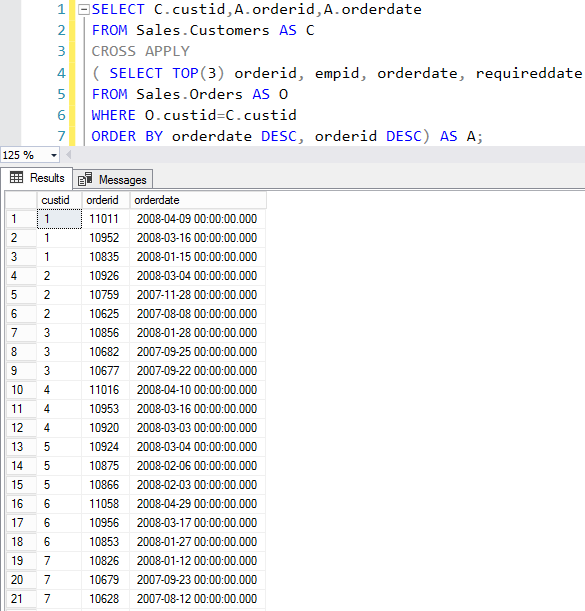
The difference is, the right table expression can represent a different set of rows per each row from the left table. For example, if you want to return most recent order from customer
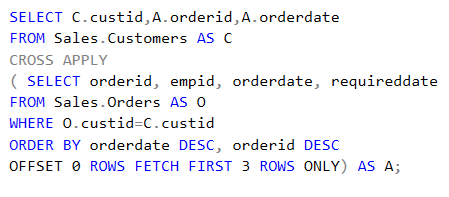
In addition, in complex queries you can use OFFSET FETCH options.
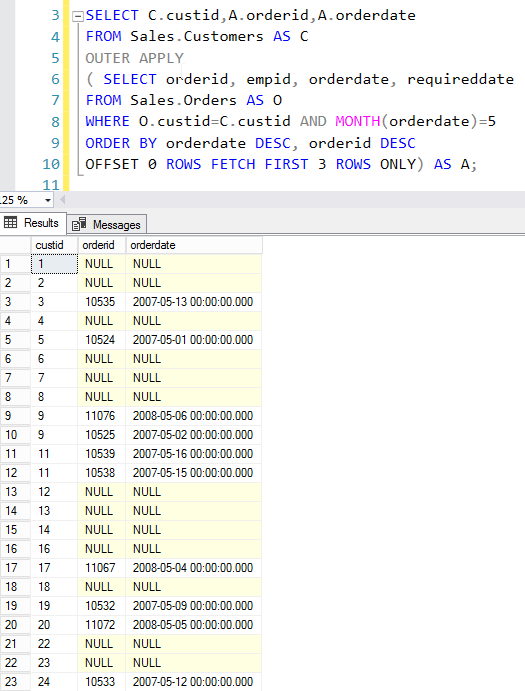
The problem with this CROSS APPLY, if the right table expression returns empty set then does not return corresponding left rows. If you want to return all the left table rows then you should use OUTER APPLY.
Cheers!
Uma

Wednesday, December 6, 2017

How to send email notification On Success and On Failure in SQL Agent job

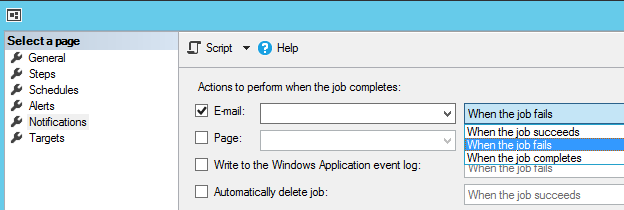
By default, you can set only one of the following options to send email in SQL Agent. Available options are:
  1. When the job succeeds
  2. When the job fails
  3. When the job completes
In most cases, this is not useful, because job might need varieties of emails such as on success or on failure. There are many ways to do this, however, the easiest way to do this just add multiple Steps and configure the main Step based on the event.
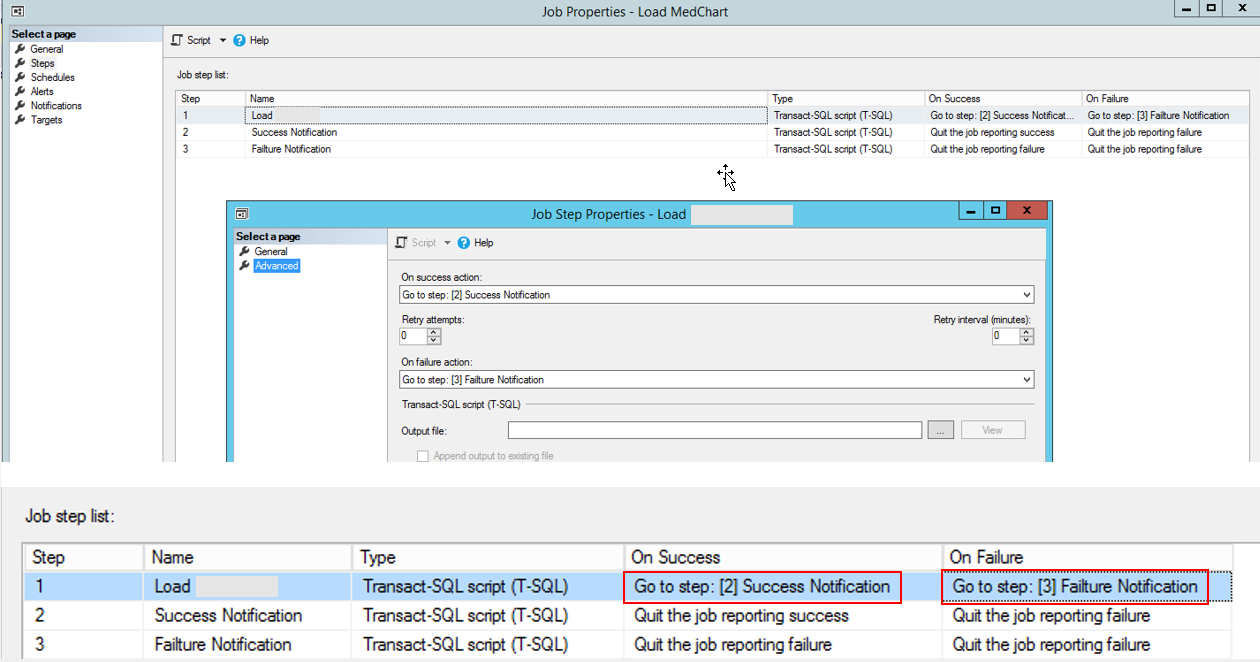
In this example, once the Load job success the Go to Step [2] and on the job failure Go to Step [3]
In here Step 2:
EXEC msdb.dbo.sp_send_dbmail  
@profile_name = 'DataWarehouse',  
@recipients = 'uma.bale@xxxx.co.nz,
@body = 'Data load successfully completed',  
@subject = Data load successfully completed’;


In here Step 3:
EXEC msdb.dbo.sp_send_dbmail  
@profile_name = 'DataWarehouse',  
@recipients = 'uma.bale@xxxx.co.nz,  
@body = 'Data load failed',  
@subject = Data load failed’;

If you want you can use single T-SQL step and send custom email notification based on the outcome. For this CASE statement or IF condition can be used.
Cheers!
Uma

Wednesday, November 15, 2017

What is the main difference between Change Data Capture (CDC) and Change Tracking (CT)

SQL Server provides two features that track changes to data in a database: change data capture and change tracking. These features enable applications to determine the DML changes (insert, update, and delete operations) that were made to user tables in a database.
Change Data Capture
Change data capture provides historical change information for a user table by capturing both the fact that DML changes were made and the actual data that was changed. Changes are captured by using an asynchronous process that reads the transaction log and has a low impact on the system.
Change Tracking
Change tracking captures the fact that rows in a table were changed, but does not capture the data that was changed. This enables applications to determine the rows that have changed with the latest row data being obtained directly from the user tables. Therefore, change tracking is more limited in the historical questions it can answer compared to change data capture. However, for those applications that do not require the historical information, there is far less storage overhead because of the changed data not being captured. A synchronous tracking mechanism is used to track the changes. This has been designed to have minimal overhead to the DML operations.
The main feature differences is Change Data Capture keep historical data and Change tracking only keep latest change using version control.
To enable Change Tracking for Database:
ALTER DATABASE LearningCT
SET CHANGE_TRACKING = ON
(CHANGE_RETENTION = 2 DAYS, AUTO_CLEANUP = ON)
To enable Change Tracking for Table:
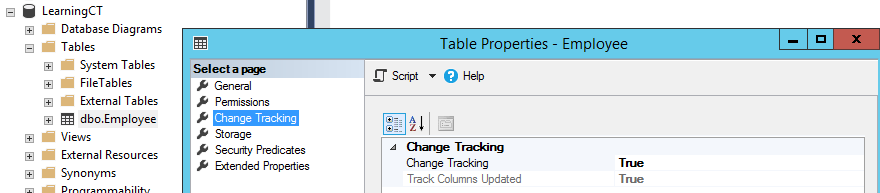
ALTER TABLE Employee
ENABLE CHANGE_TRACKING;
or
ALTER TABLE Employee
ENABLE CHANGE_TRACKING
WITH (TRACK_COLUMNS_UPDATED = ON);
One of the main condition before enable Change Tracking, the table should have primary key otherwise you will get the following error.
Cannot enable change tracking on table 'Employee1'. Change tracking requires a primary key on the table. Create a primary key on the table before enabling change tracking
The only parameter is TRACK_COLUMNS_UPDATED. When set to OFF, only the fact that the row has been changed is stored. When set to ON, the information which columns were updated is also stored, which can be read using the HANGE_TRACKING_IS_COLUMN_IN_MASK function, as shown in Part II. As this option adds overhead, it is set to OFF by default.
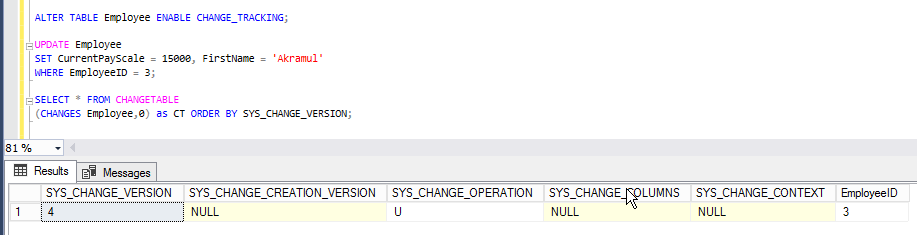
You can see the difference with and without these options
You can join this change tracking table with original table to find the change data.
SELECT Employee.*
FROM Employee
LEFT JOIN CHANGETABLE(CHANGES Employee, @latest_version) AS CHANGES
    ON Employee EmployeeID = CHANGES.EmployeeID
WHERE (CHANGES.SYS_CHANGE_OPERATION IN ('I', 'U')
In here, @latest_version can be derived via:
SELECT CHANGE_TRACKING_CURRENT_VERSION ()


Please refer the following links for more details
Cheers! Uma