By default, you can set only one of the following options to send email in SQL Agent. Available options are:
- When the job succeeds
- When the job fails
- When the job completes
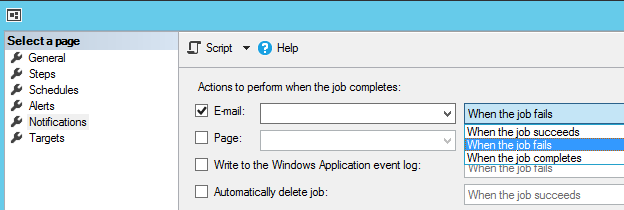
In most cases, this is not useful, because job might need varieties of emails such as on success or on failure. There are many ways to do this, however, the easiest way to do this just add multiple Steps and configure the main Step based on the event.
In this example, once the Load job success the Go to Step [2] and on the job failure Go to Step [3]
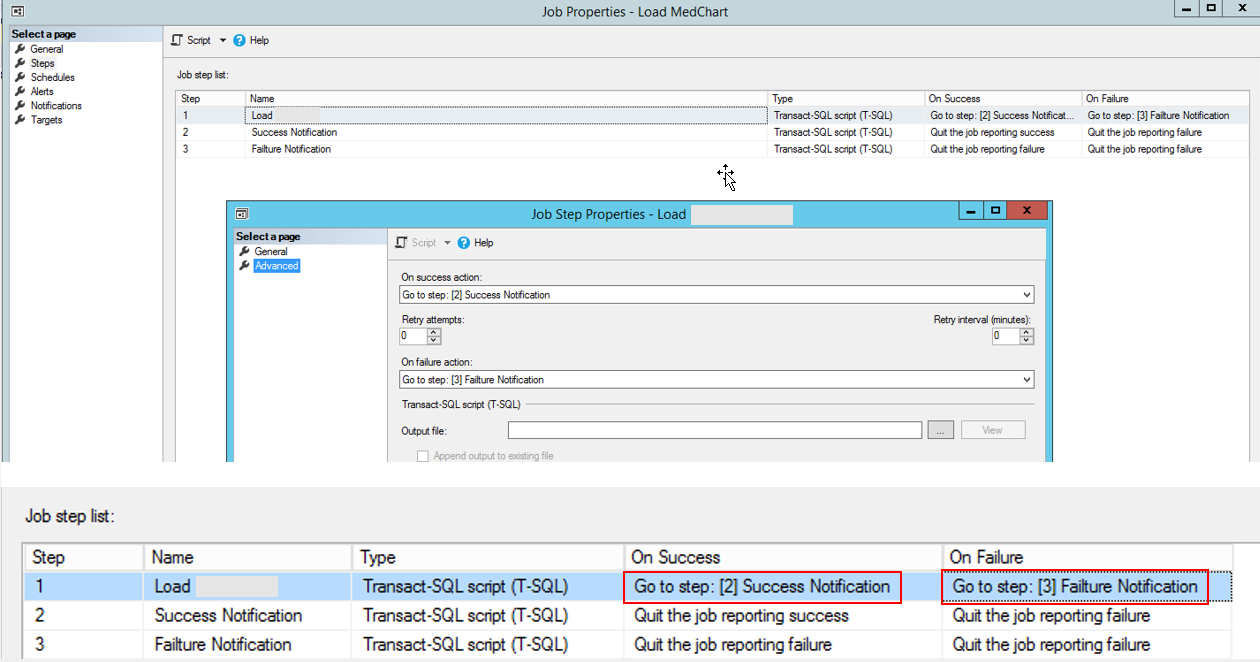
In here Step 2:
EXEC msdb.dbo.sp_send_dbmail
@profile_name = 'DataWarehouse',
@recipients = 'uma.bale@xxxx.co.nz,
@body = 'Data load successfully completed',
@subject = Data load successfully completed’;
In here Step 3:
EXEC msdb.dbo.sp_send_dbmail
@profile_name = 'DataWarehouse',
@recipients = 'uma.bale@xxxx.co.nz,
@body = 'Data load failed',
@subject = Data load failed’;
If you want you can use single T-SQL step and send custom email notification based on the outcome. For this CASE statement or IF condition can be used.
Cheers!If you want you can use single T-SQL step and send custom email notification based on the outcome. For this CASE statement or IF condition can be used.
Uma
