Showing posts with label SQL Server Administration. Show all posts

Thursday, April 17, 2014

How to find the currently in use process and KILL the process in SQL Server 2012

How to manage when you get the message like “because it is currently in use”?
For Example, when I try to Drop database, getting following error message.


In this situation, first you have to check which process is currently running on particular database and KILL the process.
SELECT * FROM sys.sysprocesses WHERE dbid = DB_ID('RegularDB')


KILL is commonly used to terminate a process that is blocking other important processes with locks, or a process that is executing a query that is using necessary system resources. System processes and processes running an extended stored procedure cannot be terminated. Use KILL very carefully, especially when critical processes are running.
KILL { session ID | UOW } [ WITH STATUSONLY ]

KILL WITH STATUSONLY does not terminate or roll back the session ID or UOW; the command only displays the current progress of the rollback.
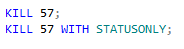
To kill the process run: KILL 57
To check the status of KILL process: KILL 57 WITH STATUSONLY;
Another alternative approach is making the database as Single User. This process closes all the existing connections.
USE master;
GO
ALTER DATABASE RegularDB
SET SINGLE_USER
WITH ROLLBACK IMMEDIATE;
GO
DROP DATABASE RegularDB;

Cheers!

Tuesday, February 11, 2014

Database diagram support objects cannot be installed because this database does not have a valid owner

When I try to create a new Diagram the following error message is pop up in SQL Server 2012:
Database diagram support objects cannot be installed because this database does not have a valid owner.  To continue, first use the Files page of the Database Properties dialog box or the ALTER AUTHORIZATION statement to set the database owner to a valid login, then add the database diagram support objects.


Solution: After running this command this problem was solved. Here TESTDW is a database name.

Wednesday, October 16, 2013

Create Linked Server in SQL Server for DB2 using IBM Informix ODBC Driver

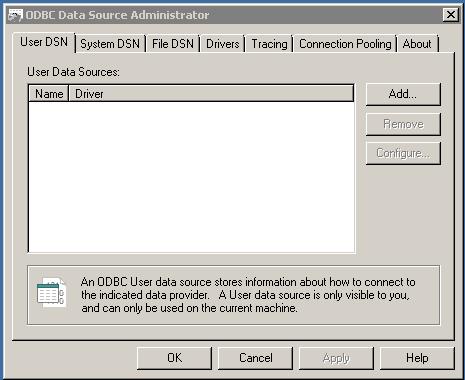
Open the ODBC Data Source Administrator:
The Microsoft® ODBC Data Source Administrator manages database drivers and data sources. This application is located in the Windows Control Panel under Administrative Tools. Beginning in Windows 8, the icon is named ODBC Data Sources, and on 64-bit operating systems there is a 32-bit and 64-bit version.
Or can use the Run command: odbcad32

This will prompt the window as shown below:

Under the System DSN, can create any number of Data source, the below image shows three data source for DB2.


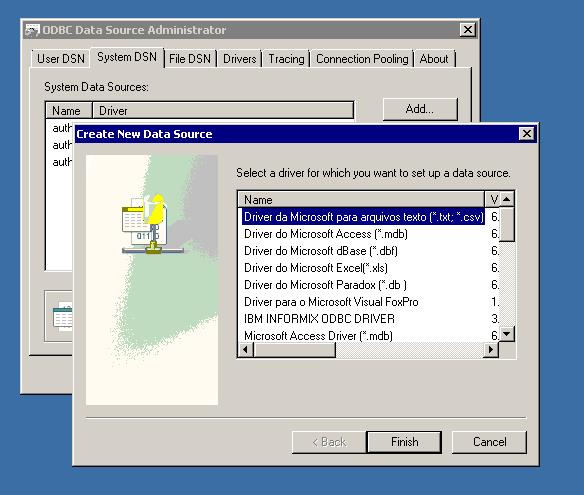
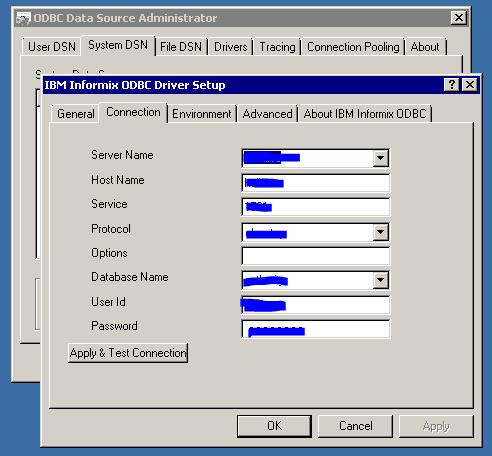
To create the new Data source, click the Add button, this will prompt other windows as shown below:
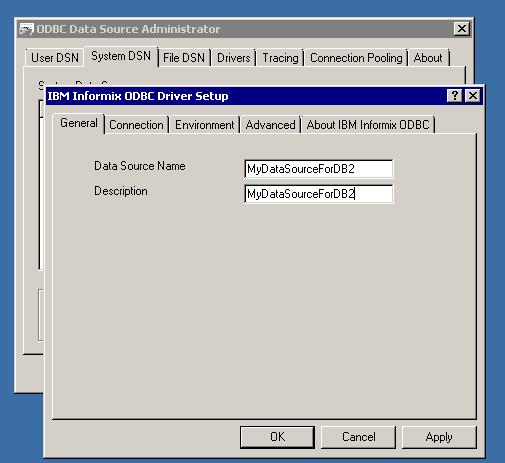
Select the IBM INFROMIX ODBC Driver and press Finish Button: Type the Data Source Name and description.
Then fill the connection details: Make sure access permission available for the perticular User ID, can be test the connection also
Leave other tabs details as default and Click ok this will create Data source.
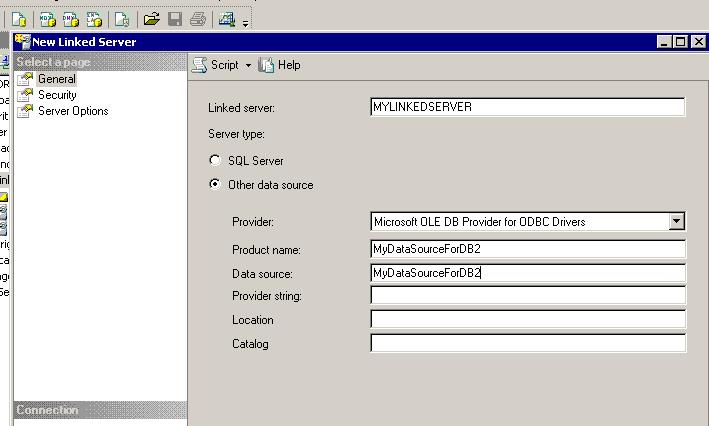
To create the Linked Server: With Admin permission open the SQL Server and create new linked server, make sure you have using the same User Id which you used for ODBC Data Source.
Type the Name of the linked server and then select the “Ole DB Provider for ODBC Drivers”.
And then Type the name of the Product Name and the Data Source (Same as Data source created under SystemDNS) as below

Under security change the "Be made using the login's current security context". It will create linked server for you.


Cheers!

Wednesday, August 7, 2013

Publishing data only using SSMS

You might come across the problem while generate the script using Data only option in SQL Server 2008 R2 – SSMS.


The Error message appears normally as follow:
Microsoft.SqlServer.Management.SqlScriptingEngine.CyclicalForeignKeyException: The selected database contains foreign keys that create a cycle. Publishing data only is not supported for databases with cyclical foreign key relationships. at Microsoft.SqlServer.Management.SqlScriptPublish.GeneratePublishPage.worker_DoWork(Object sender, DoWorkEventArgs e) at System.ComponentModel.BackgroundWorker.OnDoWork(DoWorkEventArgs e) at System.ComponentModel.BackgroundWorker.WorkerThreadStart(Object argument)


Solution: Use the SQL SERVER 2012 –SSMS.


Cheers!