Showing posts with label tFileFetch. Show all posts

Tuesday, September 29, 2015

Save File data to cache memory using tFileFetch in Talend

In tFileFetch select the Use cache to save the resource check box to add your file data to the cache memory. This option allows you to use the streaming mode to transfer the data. In this case you don’t need provide destination filename and location. You can use ((java.io.InputStream)globalMap.get("tFileFetch_1_INPUT_STREAM")) variable to access the file data.
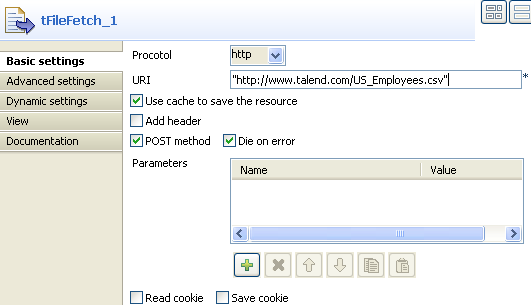
https://help.talend.com/download/attachments/9311144/Use_Case_tFileInputDelimited2_2.png?version=1&modificationDate=1355444870000&api=v2
For example, my tFileInputDelimited component uses a tFileFetch as its source and the File name/Stream field looks like this. Similar way use can use for any file format such as XML, JSON.
((java.io.InputStream)globalMap.get("tFileFetch_1_INPUT_STREAM"))
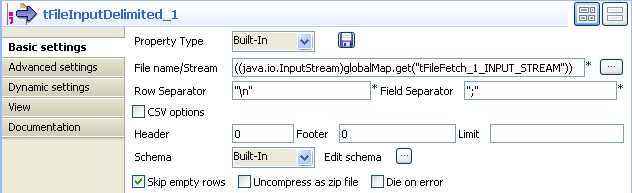
https://help.talend.com/download/attachments/9311144/Use_Case_tFileInputDelimited2_3.png?version=1&modificationDate=1355444871000&api=v2

Cheers!
Uma

Thursday, September 17, 2015

How to download multiple files at same time (parallel) using tFileFetch in Talend

You can download files parallel using tFlowToInterate component. Click on the Iterate link between tFlowToIterate and tFechFile, Enable the check box for Enable parallel execution and set the required parallel download. This Number of parallel execution should be decide based on environment such as internet bandwidth.


Cheers!
Uma